
Social Media Content Calendar: Free Template and How to Use It
A content calendar stops you from improvising and lets you see the whole month at a glance. Here is what it should include, how to fill it in and a free template to download.

If you start every day asking yourself what to post, your content depends on your mood and how much time you have that day. A content calendar, also called an editorial calendar or posting schedule, solves that: you decide once what you will say, where and when, and after that you just execute.
You don't need an expensive tool. A well-thought-out spreadsheet is enough, and at the end of the article you can download a ready-made one to get started.
A calendar is not a list of dates: it is a list of decisions. Each row answers why you are posting, with what hook and what you want the person to do next.
What columns your content calendar needs
Fewer columns get filled in faster; more columns give you more control. These are the ones I recommend keeping:
| Column | What it's for |
|---|---|
| Date and platform | When and where the post goes out. |
| Format | Reel, carousel, image, story, text. |
| Content pillar | Educate, connect, demonstrate or sell. It helps you balance the month. |
| Post goal | Reach, saves, messages, trust. One goal per post. |
| Hook | The first line or the first second. If you don't write it beforehand, it gets improvised. |
| Core idea | The one thing you want to say, in a single sentence. |
| Call to action | What the person should do when they finish. |
| Status | Idea, draft, ready, published. |
| Result | What happened: reach, saves, messages. Without this you don't learn. |
How often to post: what the data says (and its limits)
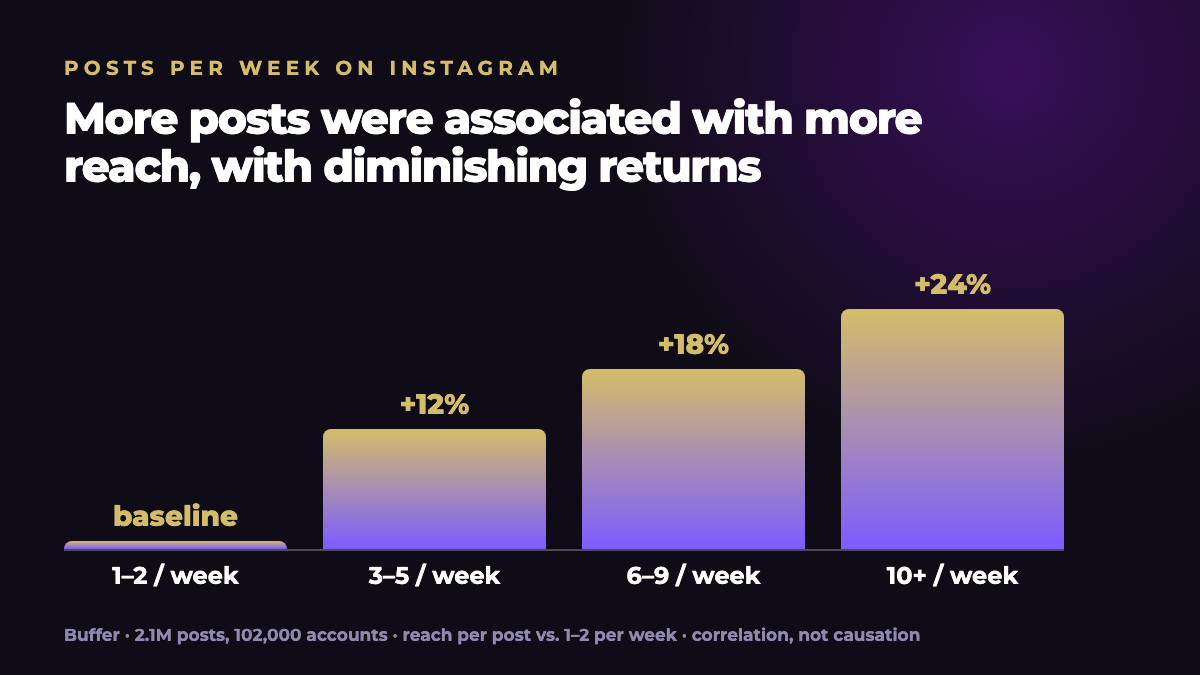
The question that comes up most when building a calendar is how many times a week to post. Buffer analyzed about 2.1 million posts from about 102,000 Instagram accounts and concluded that posting three to five times a week is probably the best balance between reach and burnout. In that study, going from one or two posts a week to three to five was associated with about 12% more reach per post [1].
Read it with care. It is a study by a single company that sells scheduling tools, it shows correlation and does not prove that posting more causes more reach, and its own authors note that quality matters more than volume [1]. My practical recommendation: choose the frequency you can keep up for three months and raise it only if you have energy to spare.
How to fill in the calendar step by step
- Define your pillars. Three or four big topics you will talk about. If they aren't clear yet, take a look at the 4-week content plan.
- Spread out your formats. Mix pieces that reach new people with pieces for those who already follow you. Adam Mosseri, head of Instagram, said in 2025 that sends by message carry somewhat more weight for content from people who don't follow you yet, and likes carry somewhat more weight for content from people who already do [2].
- Write the hooks first. Draft three options per post and pick the best; the guide to Instagram hooks will help.
- Mark the open slots. Leave one or two spaces a week for topics of the moment.
- Batch your production. Film and design several pieces in a single session.
- Review every Friday. Note the results and move whatever didn't go out.
Free content calendar template
I prepared a template with the columns above and four sample weeks. It is a CSV file: open it with Google Sheets, Excel or Numbers and adapt it to your platforms.
Download the content calendar template (CSV)
Common mistakes when building an editorial calendar
- Planning too much. A calendar of 30 posts you can't deliver gets abandoned.
- Leaving no room for the unexpected. Conversations of the moment are content too.
- Recycling without changing anything. Reusing your own material works if you adapt it to the format. Instagram, in fact, announced in 2024 that it would recommend only the original when it detects identical reposted content [3]; the safest approach is to always publish your own material.
- Not measuring. Without the results column, the calendar is a schedule, not a strategy.
How Viral Strategist helps
Viral Strategist diagnoses your account and, depending on your plan, generates a strategy with a four-week calendar and the copy and scripts for each post. You can edit the strategy before generating the calendar and change any post afterward. It doesn't publish for you: it hands you everything ready to use or to bring into your scheduling tool.
Frequently asked questions
What is a content calendar?
It is a document where you plan what you will publish, on which platform, in which format and on what date. It is also called an editorial calendar or a posting schedule.
How far ahead should I plan?
One month is a good starting point: long enough to see the big picture and short enough to adjust based on results. If you post on several platforms, plan one at a time.
What if I don't stick to the calendar?
Cut the frequency instead of abandoning the plan. A calendar you keep with fewer posts is more useful than an ambitious one you drop by the second week.
Does the template work for platforms other than Instagram?
Yes. The columns work for TikTok, LinkedIn, Facebook or YouTube. Only the format and the way you measure results change.
Sources
Data and quotes checked against the original pages in October 2026. If a figure is old or comes from a single company's data, we say so in the text.
- Buffer (Kirsti Lang and Julian Winternheimer). “How Often Should You Post on Instagram in 2026? What Data From 2 Million Posts Tells Us”. August 13, 2025. buffer.com ↗
- Andrew Hutchinson, Social Media Today. “Looking to improve your performance on Instagram in 2025?”. January 22, 2025 (quotes Adam Mosseri). socialmediatoday.com ↗
- Aisha Malik, TechCrunch. “Instagram is updating its ranking systems to surface more content from smaller, original creators”. April 30, 2024. techcrunch.com ↗